

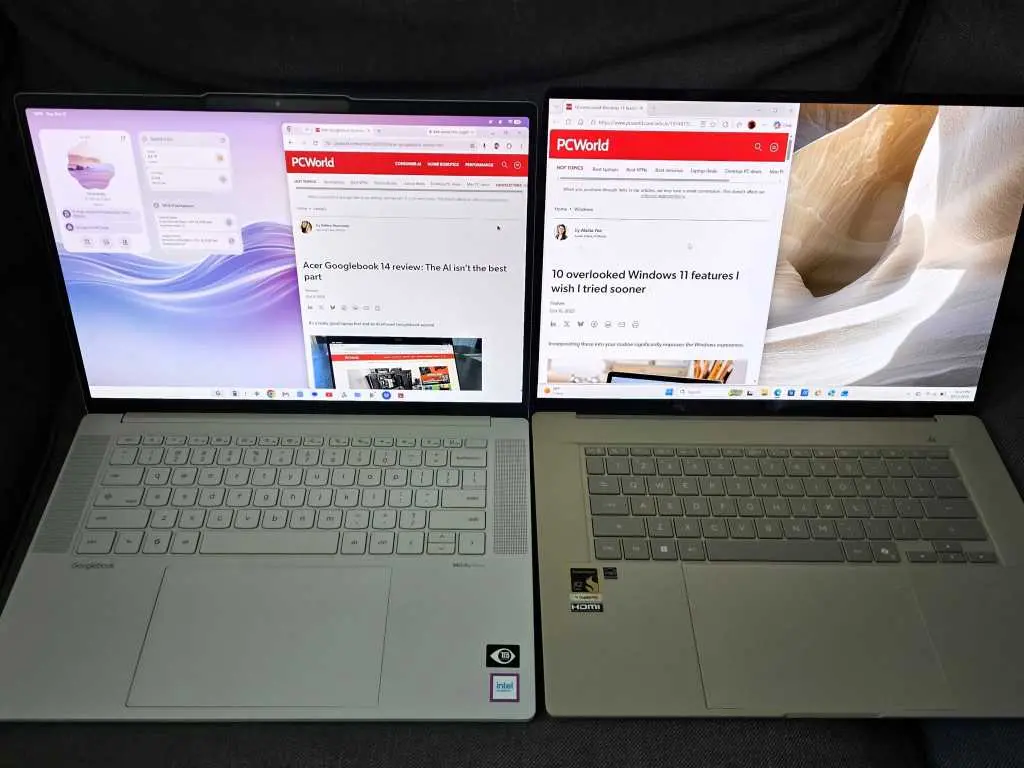
Google's new Googlebook arrives with a clear pitch: bring AI-powered productivity into the Google ecosystem and make the desktop feel more helpful, more contextual, and less dependent on traditional menus. The device runs the new Aluminium OS and includes features such as desktop widgets, Gemini-assisted widget creation, Magic Pointer screen awareness, and Rambler voice dictation. On paper, the package looks like a direct challenge to Windows 11 laptops. In practice, the first hands-on impressions describe a device with smart ideas, uneven execution, and a surprising number of everyday friction points.
Key Facts at a Glance
- Googlebook is Google's new AI-focused productivity platform, built on Aluminium OS.
- It requires an Android 17 phone for its Better Together phone integration, while Windows Phone Link supports Android 10 and later.
- Desktop widgets and Gemini-created widgets are promising, but AI widget requests can return incomplete or unsupported results.
- Magic Pointer offers screen-aware assistance, but it can take close to a minute to respond in some cases.
- Rambler voice dictation handles filler words and punctuation well, and the Caps Lock key can trigger utility shortcuts, though not consistently in every app.
- Android app compatibility is a weak point: Outlook setup was slow, required repeated authentication, and eventually crashed.
- The Lenovo Googlebook 15 test unit had a poor keyboard, choppy performance with 16GB of RAM, and no clear way to track battery life.
- A Windows laptop remained the preferred choice for keyboard quality, multitasking, app compatibility, and predictable desktop behavior.
AI Features That Show Promise
Google's most visible bet is that AI should be woven into the desktop rather than hidden inside a chatbot window. The Googlebook's widget system is the clearest example. On Windows, widgets often feel like a distraction relegated to a corner panel. On the Googlebook, widgets live on the desktop and can be created or modified to show the information a user cares about. A screen-time widget is one example of the built-in options, and Gemini can be asked to build a custom widget instead of forcing users to hand-pick every element. That is a meaningful idea, even if the execution is not yet reliable.
The limitations show up quickly. A request for an up-to-the-minute widget tracking baseball playoffs returned only scores, not the broader live context a user might expect. A request for a widget highlighting priority email was rejected because direct email access is not built in. These are not fatal flaws, but they reveal the gap between the demo and daily use. AI-generated interfaces can be powerful when they work, yet they can also leave users unsure whether the problem is the request, the model, or the platform's permissions.
Magic Pointer and Screen Awareness
Screen-aware assistance is another area where Google is trying to differentiate. Magic Pointer launches a context-aware Gemini experience when the user wiggles the mouse pointer, and it attempts to understand what the cursor is pointing toward. The interaction is more playful than remembering another keyboard shortcut, and the context-aware approach makes sense for a desktop operating system. Microsoft's Copilot Vision follows a similar broad idea, watching what is on screen once enabled and answering questions about it. Both features aim to reduce the friction of copying information into a chatbot.
Each has flaws. Copilot Vision was relatively poor at identifying what it could see in the hands-on comparison. Magic Pointer, meanwhile, took close to a full minute using its own Flash-Lite engine in at least one instance. A screen assistant that makes users wait a minute is not yet a productivity feature; it is a demo that needs optimization. The concept is strong, but latency matters. Contextual AI is only useful if it is faster than the manual alternative.
Rambler Dictation Is a Clear Win
Voice dictation is one of the areas where Googlebook clearly impressed. Rambler, Google's dictation system, accommodates the filler words that people naturally use, such as um, er, and you know, and smooths them out. Windows 11 also has dictation, including a platform-wide option and a dedicated function in Word, but the comparison suggests Windows is more literal. Rambler inserted punctuation, broke sentences apart, and applied proper punctuation during extended dictation. That is AI done right: it removes friction without asking the user to change how they speak.
Google also repurposed the Caps Lock key as a shortcut for small utilities. The idea is clever because most people do not use Caps Lock for its original purpose. Cramming several functions into a single key press could make the Googlebook feel more efficient. The catch is consistency. The Caps Lock shortcut worked in some scenarios, such as Gmail, but not in others. That kind of inconsistency undermines the promise of a simpler interface. A shortcut is only useful if users can trust it to behave the same way across the system.
The Phone Problem
The Googlebook's biggest structural weakness is its dependence on an Android phone, specifically an Android 17 phone. The Better Together feature is designed to connect the phone and the computer, but the requirement is stricter than Windows' equivalent. Microsoft's Phone Link, once called Your Phone, can connect to Android devices with much older software requirements, including Android 10. That gives Windows a practical advantage for anyone who does not upgrade phones every year. A Samsung Galaxy S23 that is fully updated and supported may still run Android 16, which is enough to keep it outside the Googlebook's phone integration.
Phone Link allows users to transfer photos, place calls, send messages over Bluetooth, and even run Android phone apps inside PC windows. From the hands-on comparison, Phone Link matched Googlebook's Better Together in most ways except app streaming. Windows can be fussy about which phones support app streaming, while Googlebook promises that all compatible phones will support its features, provided they meet the Android 17 requirement. That caveat is significant. The Googlebook's phone integration may be more consistent in theory, but it is also more exclusive in practice.
App Compatibility and Everyday Friction
Android apps are not always the answer on a desktop. Outlook works well on a Windows PC, but on the Googlebook it runs as an Android app. Setting up a work account took a long time, and the app required re-authentication every time the user logged on. It then crashed. That is the kind of friction that makes a productivity device feel less productive. Windows secures the entire operating system with Windows Hello or a password and leaves Outlook open for use. The Lenovo Googlebook includes face and fingerprint logins in front of an optional PIN, which is a good hardware feature, but it does not solve the app-level problems.
The Googlebook also showed a way to apply AI to search within its Files app, promising to append AI descriptions to files rather than rename them. That feature did not appear again during the hands-on period. More importantly, users are less concerned with how an AI describes a file than with whether they can find it at all. Windows 11's semantic search and recent changes to the Search function look just as promising, if not more so. The lesson is that AI file organization is only valuable when it improves retrieval, not when it adds another layer of metadata.
Usability and Performance Trade-Offs
Windows is full of different ways to perform the same task because it meets users halfway. The Googlebook sometimes does not. During testing, the reviewer could not immediately find how to reboot the device, even though the power button did the job. Right-clicking the desktop produced absolutely nothing, which created a nervous moment. The Caps Lock shortcut worked only in certain scenarios. These are small issues individually, but together they make the operating system feel less predictable than Windows. A productivity machine needs to be learnable, and it needs to reward existing desktop habits rather than force users to guess.
Hardware and performance also favor the Windows machine in the comparison. The Lenovo Googlebook 15 had an uncharacteristically poor keyboard for a Lenovo product. The Googlebook felt somewhat choppy and laggy even with 16GB of RAM. Running a few apps and Chrome tabs across two displays plus the Googlebook's own screen felt choppier than expected. Battery life was also difficult to judge because there was no great way to track it. Those are not minor details for people who spend the day switching between email, documents, browsers, and chat apps.
Market Context and the Windows Alternative
The Googlebook launch landed in a crowded hardware moment. It arrived within roughly a week of the Nvidia RTX Spark platform, another novel PC effort, and the market is also preparing for expensive AI workstation notebooks. Microsoft has been briefing a Surface Laptop Ultra, and the broader PC industry is pushing AI features into every layer of the operating system. In that context, Googlebook's AI tricks are notable because they try to make the desktop itself more intelligent. But novelty is not the same as readiness. A Windows laptop still offers a more mature app ecosystem, a wider range of hardware, and a familiar set of keyboard and multitasking conventions.
The Windows laptop in the comparison had a far superior keyboard, smoother performance for mixed workloads, and a more predictable approach to security and app management. That does not mean every Googlebook feature is a failure. Desktop widgets, Rambler dictation, and the Caps Lock utility concept are genuinely smart. The problem is that the whole package does not yet cohere. The phone requirement is too strict, Android apps can be unstable, screen-aware AI can be slow, and small usability gaps add up. For users who live entirely inside Google's ecosystem and own the right phone, the Googlebook may become more appealing over time. For everyone else, the safer choice remains a Windows laptop.
Source:PCWorld News