

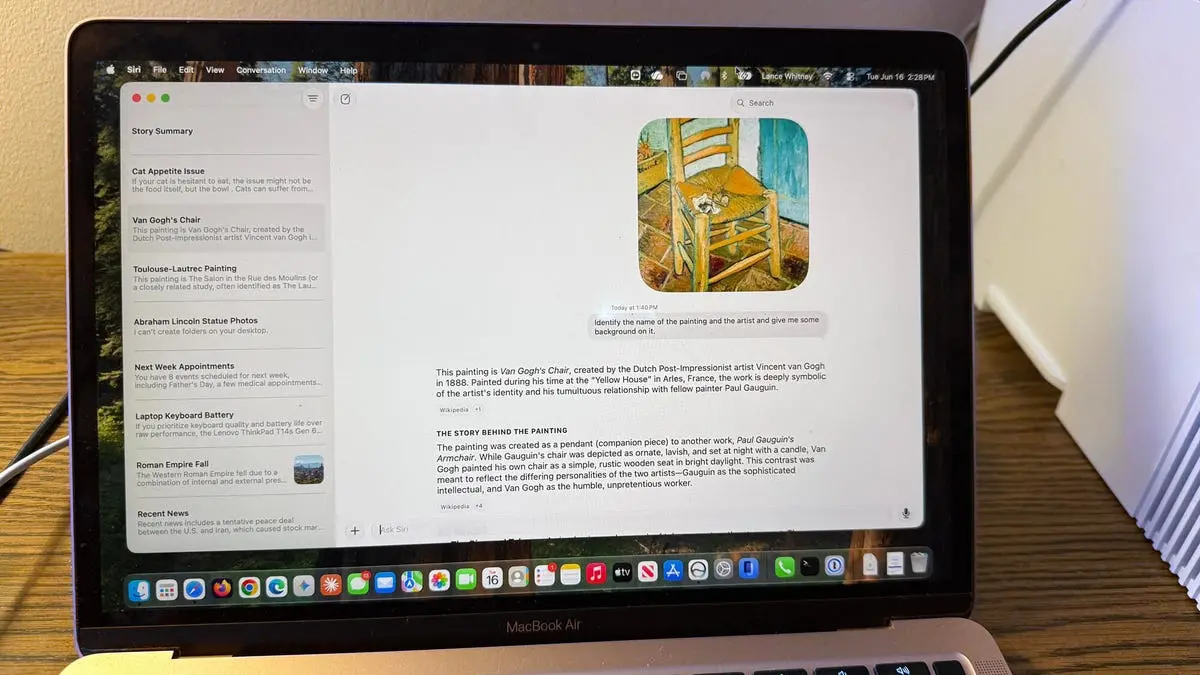
As an iPhone and Mac user, I've often complained about the many faults and flaws of Siri. That's why I've been anxious to check out the new Siri AI that Apple touted at WWDC 2026 earlier this month. Available by waitlist for supported devices with the macOS 27 developer beta, the new Siri promises to be more conversational, more responsive, and less error-prone. Is that the case? That's what I wanted to find out.
To try the new Siri, you need to surmount a few barriers. First, your Mac must not only support macOS 27 but also have Apple Intelligence capability. Devices like the MacBook Air M1 and later, MacBook Pro M1 and later, iMac M1 and later, Mac mini M1 and later, Mac Pro M2 Ultra, and Mac Studio M1 Max and later are compatible. Second, you need to install the developer beta—since these betas can be unstable, I strongly advise using a spare device. I have a spare MacBook Air M1 for testing. Third, you'll have to join a waitlist. Go to System Settings, select Siri, and tap Turn Siri On. A message will notify you when the new Siri is ready. I joined the waitlist on my iPhone a week ago and am still waiting, but on my Mac I got access without a long delay.
If your Mac meets the criteria, you can access Siri AI in several ways: voice activation by saying "Hey Siri" or "Siri", clicking the new Siri AI app icon on the Dock, pressing the Command key twice to bring up a text input window, or using the Spotlight search (Command+Space) to ask Siri to find something. Right-clicking on a window also gives an "Ask Siri" option. To put Siri AI through its paces, I posed general and specific questions, told it to find certain files on my computer, and tried to engage it in back-and-forth conversations. Here are the ten tests I conducted and how Siri AI performed.
Test 1: General knowledge query – "What's new?"
First up, the new Siri does work like ChatGPT, Gemini, and other chatbots in many ways, but it's less chatty and more direct. I started by asking Siri what's new. Instead of engaging in personal chit-chat, it gave me a rundown of the latest news stories. This shows Apple is treating Siri AI more as an intelligent assistant and less like a conversation partner. The response was succinct and included headlines from trusted sources, similar to what you'd get from a news aggregator.
Test 2: Historical question – "Why did the Roman Empire fall?"
Next, I posed a general knowledge question: "Why did the Roman Empire fall?" Siri provided a short explanation that it read aloud, followed by bullet-point causes like political instability, economic decline, and barbarian invasions. The answer was about the same length as what ChatGPT would give. Siri also cited its sources, with links you could open to verify the information. This was a significant improvement over old Siri, which often returned web search results without summarizing.
Test 3: Recommendation request – "What laptop should I buy?"
I told Siri I had $2,000 to spend on a laptop and value keyboard quality and battery life more than performance. In response, Siri initially linked me to a few articles and social media posts about laptops but didn't give its own opinion or even summarize the information. I then followed up asking it to summarize and give its own recommendation. Only then did Siri provide a coherent answer: it suggested the MacBook Air M3 or a similarly priced Windows ultrabook, highlighting keyboard comfort and battery life. This shows Siri can handle multi-step requests, but it doesn't proactively offer synthesis.
Test 4: Calendar integration – "Show me my appointments"
With Siri's ability to find information on your device, I asked it to show my appointments for next week. It consulted my calendar and correctly displayed all scheduled events, including times and locations. This worked flawlessly, matching the capability of other voice assistants like Google Assistant.
Test 5: Photo search – "Find all photos of the statue of Abraham Lincoln"
Next, I wanted to test specific on-device search. I asked Siri to find all photos of the statue of Abraham Lincoln in my Photos library. Siri returned only three photos, but my library actually contained six matching images. I'm not sure what criteria it used—it may have been confused by the word 'statue' or it applied too narrow a filter. Other similar requests also yielded incomplete results. This area clearly needs improvement.
Test 6: System control – "Turn on Do Not Disturb"
To test device control, I asked Siri to turn on Do Not Disturb mode. It complied immediately. I then asked it to turn it off, and again it worked. This basic system command handling is on par with Siri's previous capabilities, but the new Siri did it with less lag.
Test 7: Image analysis – "Identify this painting"
Like most AI assistants, Siri can analyze uploaded files. I uploaded a photo of a painting by Toulouse-Lautrec and asked for the name and artist. Siri got the wrong name for both the painting and the artist. I tried a second painting—this time it identified the correct artist but misnamed the painting. A third attempt with a Van Gogh painting succeeded. So accuracy varies significantly, which is concerning for a feature that relies on visual recognition.
Test 8: Advice and follow-up – "My cat Mr. Giggles won't eat"
I told Siri my cat Mr. Giggles sometimes won't eat his usual food and needed suggestions. Siri provided clear, helpful advice: try different flavors, warm the food, check for dental issues, and consult a vet. It also asked whether my cat eats wet or dry food. After I answered, it gave more specific tips. However, the conversational flow was awkward. After each response, Siri seemed to stop listening; I had to click the microphone icon again to continue. This lack of sustained back-and-forth fluidity is a major drawback compared to ChatGPT and Gemini.
Test 9: On-screen content analysis – "Summarize this story"
To test screen awareness, I right-clicked on one of my ZDNET articles and chose 'Ask Siri.' Initially, asking "Summarize the story" didn't work—it seemed confused. Then I said "Summarize what you see on the screen," which only summarized the visible text. Finally, when I said "Summarize the story on the screen," Siri correctly parsed the entire article and gave a concise summary of the key points. This demonstrates that phrasing matters greatly, but once correct, the feature is useful.
Test 10: Conversation history management
Like other AI apps, Siri AI keeps track of conversations and syncs them across Apple devices. I right-clicked a previous chat and could rename it, pin it, open in new window, or delete it. I also resumed a past chat to correct an error—I told Siri it was wrong about the Toulouse-Lautrec painting. Siri tried again but was still mistaken. Only after I explicitly said the painting was by Toulouse-Lautrec did it correctly identify the name and provide background. This shows that while history management works, the AI struggles to learn from corrections within the same conversation.
Overall assessment
The new Siri AI is an improvement over the old one, but it still makes mistakes—some basic, some more nuanced. The back-and-forth conversation mode is clumsier than it should be, and accuracy in file identification and visual analysis is inconsistent. However, this is just the first developer beta. Apple has several months to refine it before the expected public release in September. The foundation is promising, especially in device integration and direct answer giving, but competing with ChatGPT and Gemini will require more work on conversational fluidity and error recovery.
Source:ZDNET News