

Headline
The touchscreen MacBook Pro is just a MacBook Pro with a touchscreen.
Key facts
- Apple has released a touchscreen MacBook Pro after years of saying a touchscreen laptop was unlikely.
- The new model is thinner and lighter than previous MacBook Pro designs and features an OLED display marketed as PROLED XDR.
- The OLED panel delivers deeper blacks, high brightness, rich colors, and support for advanced color modes for professional workflows.
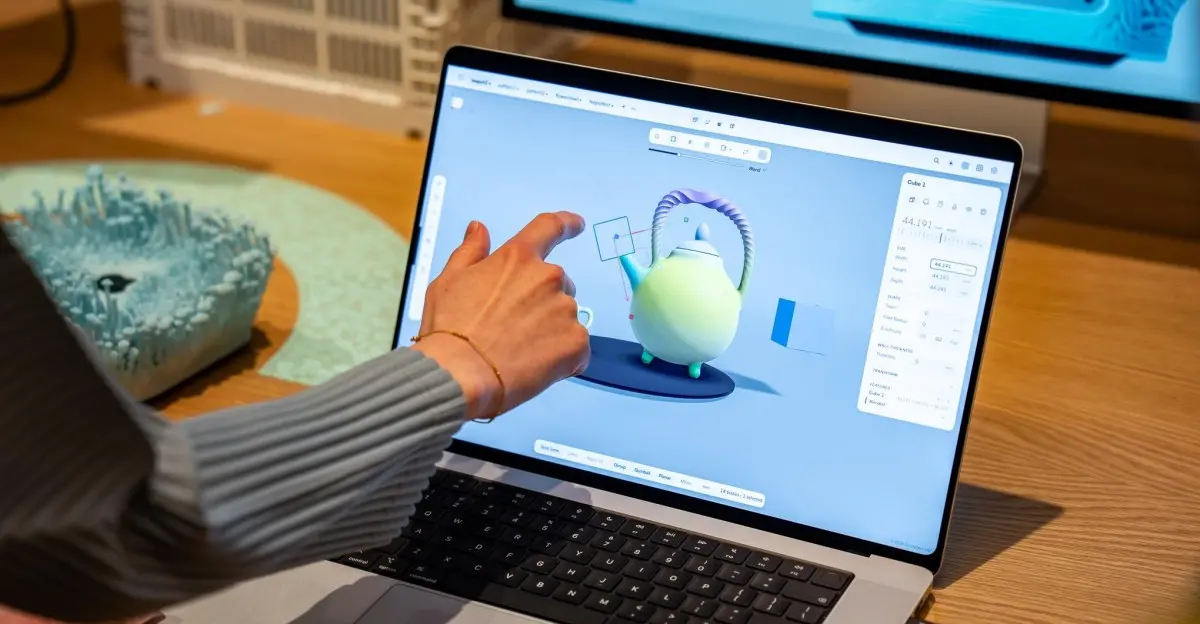
- The touchscreen works with basic taps and swipes, and some macOS 27 Golden Gate interface elements respond with slight magnification or expansion.
- Most touch gestures map to actions already available on the trackpad, and early professional users continued to rely on keyboard and trackpad input.
- The laptop includes a Dynamic Island instead of a notch and brings back an illuminated Apple logo on the lid.
- There is no Apple Pencil support and no 360-degree hinge, and Apple has not presented the touchscreen as a redefinition of laptop workflows.
A familiar laptop with a touchable screen
Apple’s long-anticipated touchscreen MacBook Pro has arrived, and the most surprising thing about it is how normal it feels. The company spent years arguing that touchscreens on laptops were ergonomically awkward and unnecessary, so expectations were high for a breakthrough. Instead, the new machine behaves like a standard MacBook Pro that happens to respond when someone reaches out and taps the display. That is not a criticism by itself. It is simply the central fact of the product: the touchscreen is an additional input method, not a new philosophy for personal computing.
The laptop is thinner and lighter than earlier MacBook Pro models, and it has an OLED display that Apple markets as PROLED XDR. The panel is one of the best screens seen on a laptop, with inkier blacks than the previous Mini LED generation, strong brightness, rich colors, and effectively infinite contrast. Apple calls it a reference-caliber display, and the claim is supported by support for advanced color modes aimed at professional users. For photographers, video editors, and designers, the display may be the most meaningful upgrade on the entire machine.
The touchscreen does not reinvent the Mac
The touchscreen itself is far more modest. Users can poke and swipe at the screen, and some interface elements in macOS 27 Golden Gate expand or magnify slightly when tapped. Those small responses are pleasant, but they do not amount to a new way of using a laptop. The gestures mostly mirror actions that already exist on the trackpad. There is no dramatic new canvas, no radical gesture language, and no indication that Apple has solved a long-standing ergonomic problem in a surprising way. The feature is present, it works, and it feels like an afterthought.
That assessment is reinforced by the way Apple has demonstrated the machine. In briefings, professionals who had recently started using the touchscreen MacBook Pro did not describe workflows that had been transformed by touch. They still defaulted to the keyboard and trackpad for most tasks. The touchscreen was a bonus for occasional taps, swipes, or direct manipulation, not a replacement for the established input methods that have defined laptop use for decades. When asked whether they wanted Apple Pencil support, several users said it would be nice to have, but they did not frame it as essential.
A decade of false starts for touchscreen laptops
The muted arrival is notable because touchscreen laptops were once expected to be revolutionary. More than a decade ago, Microsoft built Windows 8 around a touch-optimized interface and encouraged hardware makers to experiment with flipping, folding, and convertible designs. Laptops became more flexible, sometimes in genuinely creative ways, but the revolution did not arrive. Windows 8 struggled, and convertible laptops settled into being another product segment rather than a redefinition of the laptop. Users accepted touchscreens when they were available, but they did not abandon keyboards and trackpads in large numbers.
Apple watched that history unfold and waited. Its executives repeatedly dismissed the idea of a touchscreen Mac, arguing that reaching across a keyboard to touch a vertical display was not a good experience. The new MacBook Pro does not disprove that concern so much as sidestep it. Apple has added touch without forcing users to depend on it. The result is a laptop that can accommodate the natural urge to tap a screen while preserving the traditional Mac setup. In that sense, the company is not leading a new era; it is acknowledging that the old objections no longer justify withholding a feature that many people expect.
The display and design carry the upgrade
In practice, the OLED panel and lighter chassis do as much to make the new MacBook Pro feel special as the touchscreen does. The move from Mini LED to OLED improves black levels and contrast in ways that are immediately visible, especially in dark rooms and high-dynamic-range content. Brightness remains high enough for outdoor use, colors are saturated without looking artificial, and the advanced color modes give professional users more control over how their work appears on screen. Those improvements are familiar parts of display evolution, but they matter more than the ability to swipe at macOS.
The design changes are equally tangible. The Dynamic Island replaces the notch, freeing up a bit more visual space and giving the laptop a more modern front-facing appearance. The return of the illuminated Apple logo on the lid is a nostalgic touch that drew a strong reaction during the presentation. Neither feature changes how the laptop works, but both contribute to the sense that this is a refreshed product rather than a simple spec bump. The touchscreen is part of that refresh, but it is not the most convincing part.
Settings, gestures, and missing features
A look at the touchscreen settings menu makes the limits clear. Most touch gestures are mapped to functions that already exist on the trackpad, which keeps the learning curve low but also makes the touchscreen feel redundant. Users can tap buttons, scroll through pages, and interact with certain apps directly, but there is no deep system of touch-specific commands that changes the character of macOS. The feature is designed to be optional, and it succeeds at being optional. It does not succeed at being transformative.
The absence of Apple Pencil support is another signal that Apple is treating touch as a secondary input. A stylus could make the touchscreen more useful for drawing, note-taking, photo editing, and precise selection, but the company has not included it. Nor has Apple added a 360-degree hinge that would allow the laptop to fold into a tablet-like shape. Those omissions keep the MacBook Pro firmly in laptop territory. The touchscreen is there for people who want to reach out and tap, not for people who want a convertible device.
A strategic release with room to grow
The restrained approach may be strategically sound. By adding touch without redesigning the Mac around it, Apple avoids the mistakes of earlier touchscreen experiments and keeps the MacBook Pro familiar for its core audience. The company also sets the stage for touchscreens to appear in more affordable laptops later. If the feature proves useful and uncontroversial on a high-end model, it can gradually spread to lower-priced devices without requiring a radical shift in software design. Apple already offers many touch-based products for people who prioritize touch, so the Mac does not need to become one of them overnight.
Still, the release invites questions about what Apple could have done with more ambition. The company took more than a decade to come around to the idea, and the first result is a conventional laptop with a touch-enabled display. That may be enough for many buyers, especially those who have wanted a touchscreen Mac for years. But it does not answer what a truly touch-optimized Mac would look like. It does not offer a new hinge, a stylus, or a set of gestures that make the trackpad feel obsolete. It simply removes a long-standing limitation and lets users decide whether touch matters to them.
For now, the touchscreen MacBook Pro is best understood as a normal MacBook Pro with an extra capability. The OLED display, lighter body, Dynamic Island, and illuminated logo are all meaningful updates, and the touchscreen is a welcome convenience for occasional use. The feature is unlikely to change how most people work, but it no longer needs to. Apple has finally shipped the obvious version of the idea, and that may be the most practical outcome of all. The touchscreen is now simply another feature in a mature laptop line, not a new category.
Source:The Verge News