

Over a year ago, I started capping my phone at 80 percent, and I'll admit there were days I second-guessed it. The real issue was that it felt like it died too quickly for something that may never get results. However, I was wrong; it got real results, and I know this because my wife decided not to use the same model, and the differences are glaring.
Stop your phone from charging all the way
A full battery wears out a lot faster
Before you do anything else with your phone, it's worth setting up one thing that'll protect the battery for the long haul. Regardless of what you may think, every lithium-ion battery is basically a consumable. That means it's going to wear down over time, no matter what you do.
The time it takes to become useless depends a lot on the environment it lives in and how you charge it day to day. Your phone might be a powerhouse, but its battery is still subject to the same chemistry as any other lithium-ion cell, and pushing it too hard for too long will erode its capacity and performance.
That's why it makes sense to set this up on day one, before your charging habits even have a chance to start doing damage. However, it's never too late to start, and I didn't start doing this until years after I bought my phone. Taking control of how your phone charges right from the start means you're heading off a lot of that wear before it ever happens, and your battery will simply last longer as a result.
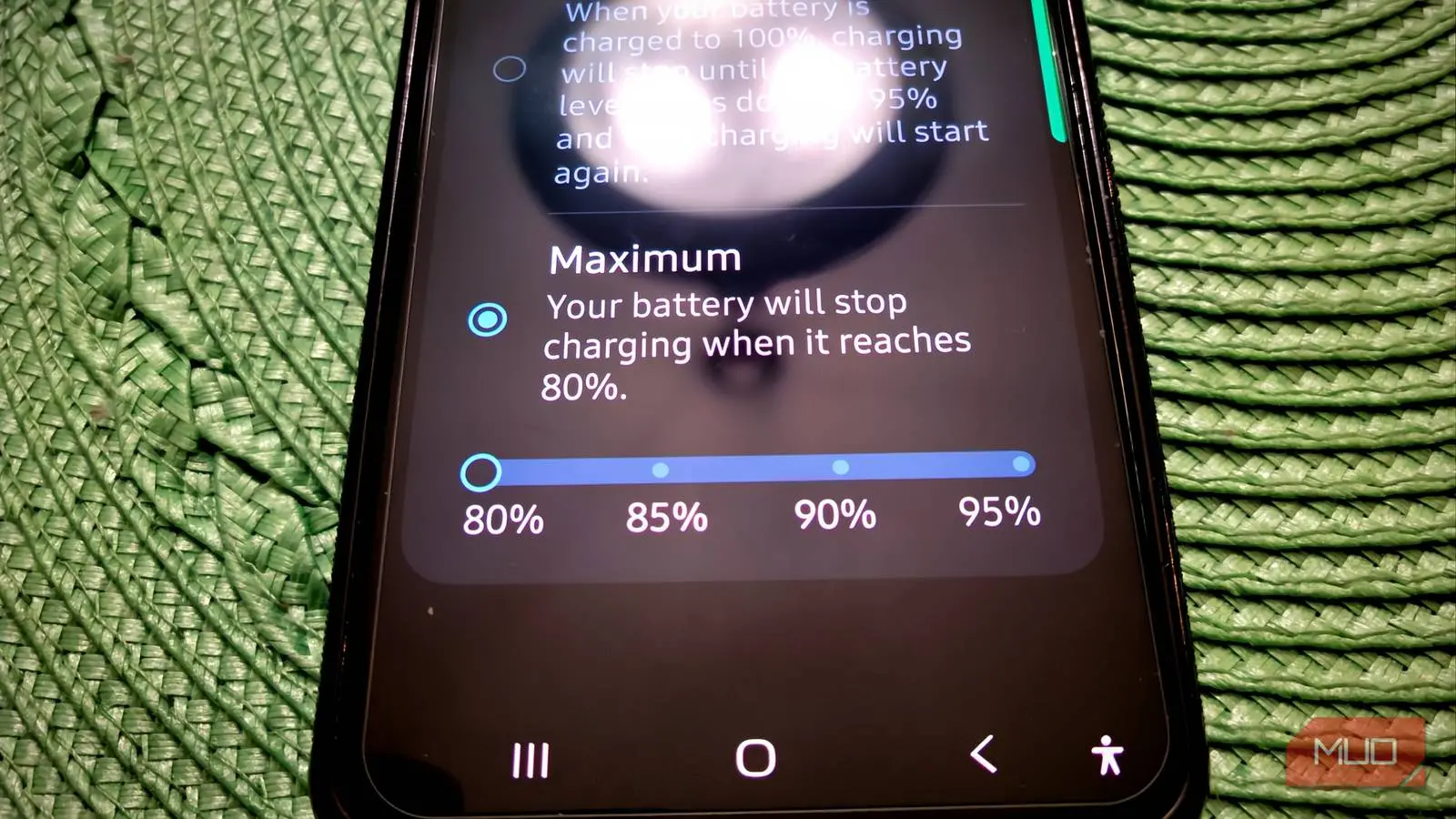
What you want to do is go to your battery health settings and enable the option that stops charging at 80 percent. The idea is to keep the battery out of that high-voltage zone it hits when you push it all the way to full. Normally, charging to 100 percent means the battery's sitting at somewhere between 4.20 and 4.35 volts per cell, which is great for squeezing out every bit of runtime, but rough on the battery itself.
That last stretch, from 80 to 100 percent, is the hardest part of the whole charge. You're basically cramming lithium ions into a space that's already nearly full, and that generates extra heat the battery doesn't need. Sitting at that high voltage for any length of time speeds up the unwanted chemical reactions going on inside that are actively killing the battery. If you cap it at 80 percent instead, you're sidestepping most of that voltage-driven stress. Do that consistently, and you could double, maybe even quadruple, how many charge cycles your battery has in it.
If you've got an iPhone 15 or newer running iOS 18, just open Settings, go to Battery, tap Charging, and pick the 80 percent charge limit option. On Android, go to Settings, then Battery, then Battery Health and Charging Optimization, and flip on 'Limit to 80%.' Galaxy users can do the same thing through Settings, then Battery, then Battery protection, where you'll choose the option that caps things at 80 percent.
You can go higher, but just keep in mind that it's a trade-off. The more you add, the more damage you could do over time.
How my phone held up after five years
You'll have to get used to charging it mid-day
I've been capping my phone's battery at 80% for over a year now, and for a few years, I tried other settings too. It's not something you'll get used to quickly. At first, the hardest part was just remembering that 80% is done. Unplugging my phone and seeing it already sitting at 20% below full took some getting used to.
On busier workdays, I could really feel the difference in how much screen time I had left by the afternoon, so I started keeping a charger near my desk and charging my phone much sooner than I normally would. Before, my phone would hit 15% by the end of the night. Now, since I charge it in the middle of the day, it still has a good deal of charge before bed.
That's also annoying if you forget to charge it regularly in the middle of the day. You're giving up that extra cushion of battery, and for the first few months, it genuinely felt like I'd turned my phone into a slightly weaker version of itself on purpose.
My wife bought the same phone as I did on the same day, but she didn't do that. I started messing with the battery settings around the second to third year. At this point, her phone needs to be replaced; it gets hot all the time, has Wi-Fi issues, and takes much longer to charge than mine.
Mine still feels pretty new. I used to roll my eyes at the thought of one setting making a phone last longer. However, it's completely true in this case. My wife and I have the same type of case, and her phone's back, where the battery sits, burned off, while mine is perfectly fine. It feels like a cheat code to make your phone last longer.
Running out of battery faster than you'd expect is a big trade-off and very annoying. But it is worth it because my phone feels like I just bought it a year ago, and I've had it for five years now.
You'll need to use your phone a little differently
Your battery will still die eventually
There are some things I try to turn off or not use apps that drain the battery unless I have to. So, continuous mobile data tethering, GPS navigation when not driving, and only taking pictures or videos when I really want to.
For anyone who loves taking out their phone and having it run everything at once, this is a big change. However, I didn't really need any of this running, and it turned out to be a good bonus.
I've only used it twice, but I also carry a power bank around. You never know when you'll need it. There's also the USB-C in my car for charging my phone.
This won't save your battery forever
None of this erases the basic limitation of lithium-ion batteries. They wear down no matter what you do; that's a fact. So even if you're the best owner, that battery won't last a lifetime. But if you've ever replaced a phone early just because the battery couldn't make it through the day anymore, this is the fix for that specific problem. A few weeks of adjusting your charging routine now buys you a battery that still feels new years from now.
For those interested in understanding the deeper science, lithium-ion batteries degrade primarily due to two phenomena: lithium plating and electrolyte decomposition. Both are accelerated by high voltage and high temperature. Capping at 80% reduces the peak voltage and keeps the battery cooler, drastically slowing these processes. Studies from battery research groups indicate that cycling between 30% and 80% can extend lifespan by 200% to 400% compared to full 0-100% cycles. This is why many electric vehicle manufacturers recommend similar limits for daily use.
Additionally, modern smartphones have sophisticated battery management systems, but they still rely on user choices. Enabling the 80% limit is a simple way to take advantage of that hardware. Even if you forget and occasionally charge to 100%, the long-term benefits remain significant as long as most charges stop at 80%. Consistency is key.
Another factor to consider is the charging speed. Fast charging generates more heat, which is also damaging. While capping at 80% reduces stress from high voltage, pairing it with a slower, standard charger can further improve battery longevity. However, that may not be practical for everyone, so even just the limit helps.
I also noticed that my phone's battery health, as reported in the settings, remained above 90% after five years, while my wife's phone dropped below 70% and started causing performance throttling. The heat issues she experienced led to the phone shutting down unexpectedly during hot weather. In contrast, mine never had a thermal shutdown. This real-world comparison convinced me that the minor inconvenience of more frequent charging is well worth it.
To make the transition easier, I recommend buying a quality power bank. A compact 10,000mAh unit is enough for a full top-up, or a larger 20,000mAh one can cover multiple days. I keep one in my bag for days when I know I'll be out late. It's a small price for peace of mind and extended device life.
Ultimately, the decision to cap at 80% comes down to your priorities. If you plan to replace your phone every two to three years, you may not see a huge benefit. But if you want to keep a device for four years or more, this simple setting can save you from an expensive battery replacement or early upgrade. My experience proves that the trade-off is worthwhile.
Source:MakeUseOf News